Quick update: Using dust to free space on my Pi
I logged onto my Raspberry Pi this morning to find that its root filesystem was 100% full (minus the usual space reserved by the kernel).
My Pi runs off of a microSD card with only 16 GB of space, so I wasn’t entirely surprised to find it filled up. However, in this case there ended up being an easily-rectifiable root cause: a typo at the end of one of my bash scripts.
Cleaning up my home directory with du
I started off using the du command in my home directory (/home/pi) to see if there were any obvious space hogs:
sudo du -h --max-depth=1 /home/pi
This showed me that the two largest folders were ~/.vscode-server and ~/.vscode-server-insiders, at around 400 MB each. These are two copies of the server software that lets me connect to my Pi in Visual Studio Code and access it as a remote development server. Since I only plan on using the Insiders version of VSCode for this in the future, it was an easy decision to remove ~/.vscode-server.
Cleaning up elsewhere with dust
Now that I had some free space to play with, I decided to install dust, an alternative to du that works much faster and gives a visual summary of the largest subdirectories or files.
There’s no Debian package for dust, so I installed it by downloading the dust-v0.8.6-aarch64-unknown-linux-gnu.tar.gz binary archive from its releases page on Github, and transferring the dust binary to /usr/bin/dust on my Pi. I found that the best way to use it was with the -x flag, ensuring that it sticks to one filesystem (equivalent to du -x).
sudo dust -x /
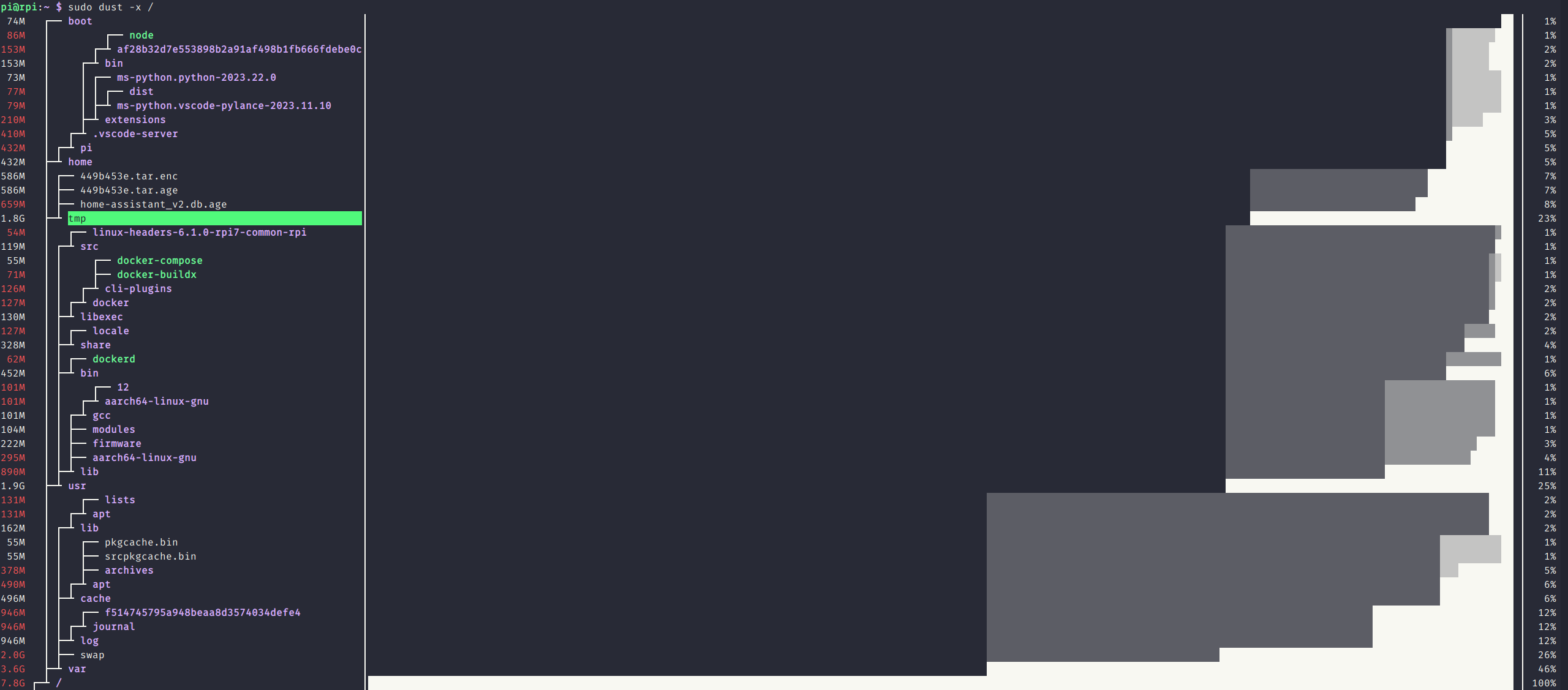
This brought a few space-wasters to my attention, which I could then delete:
- A backup of Home Assistant that I temporarily copied to
~/while restoring it (294 MB) - Data that had been written to a mount point (by the Home Assistant container) while the drive wasn’t mounted (794 MB)
- A
.mp4file that I’d transferred to the Pi for testing purposes (2.8 GB) - Binary files that I’d copied to my home directory before installing to
/usr/bin(15 MB)- This includes
dust, but it only takes up 2 MB anyway :D
- This includes
- Temporary files generated by one of my bash scripts that had lingered in
/tmp(1.8 GB)- These were from my script that encrypts files and uploads them to the cloud for off-site backup (the encrypted files had lingered)
- I of course then fixed my script to properly delete the encrypted files once it finishes
Result
Only 43% of the Pi’s microSD card is now used (that’s 7.8 GB free), which should mean that I wont’t have to worry about it being filled up in the near future. That is, unless I make another misbehaving script!